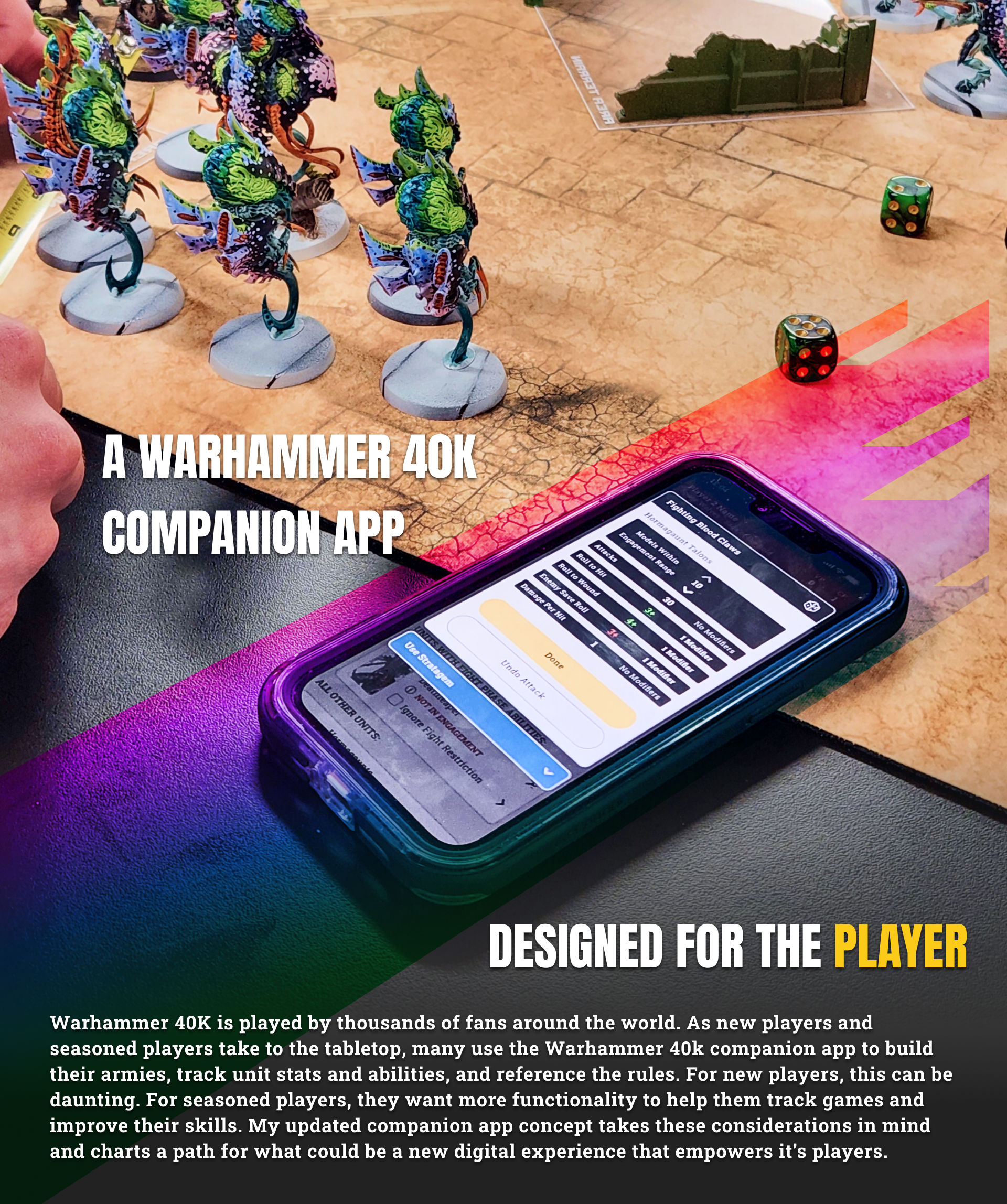

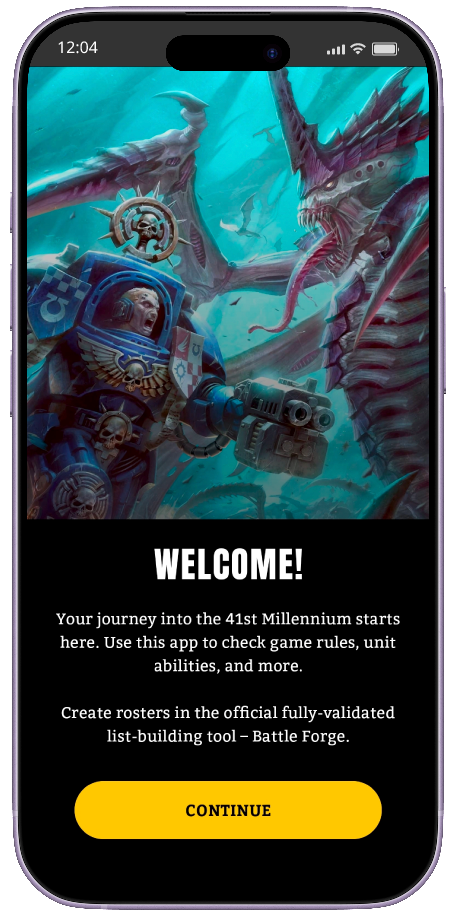
As a UX designer and researcher in 2026, it seems like there is a new tool to learn every day. I started this project to stress-test some of these new tools and processes, the main tool being Figma Make. After learning the basics of Figma Make, I started planning how best to put it through it's paces, as well as think about the kind of experience I wanted to make.
I landed on the Warhammer 40K's companion app as my focus for this experiment. As a player there was a lot of functionality and quality of life additions I wanted to add to the existing app. The plan became:
I landed on the Warhammer 40K's companion app as my focus for this experiment. As a player there was a lot of functionality and quality of life additions I wanted to add to the existing app. The plan became:
■ Improve the app with game set-up, game management, and post game analysis
■ Tailor the experience around new players and advance players
■ Use Figma and Figma Make from the beginning to explore, ideate, and prototype
■ Conduct usability research with real players and get feedback
■ Allow two players to connect, set up, and play a game while the app did the heavy lifting
■ Tailor the experience around new players and advance players
■ Use Figma and Figma Make from the beginning to explore, ideate, and prototype
■ Conduct usability research with real players and get feedback
■ Allow two players to connect, set up, and play a game while the app did the heavy lifting
(Disclosure) This is not a real or functional app that is meant to compete with the existing Games Workshop 40k app. It's just meant to be a fans exploration concept for what could exist and what I as a player would like to see added to the current apps functionality. GW owns all rights for the content of 40K.

Players in the 40k tabletop scene are passionate, intelligent, and fast learners. This is good because 40K is complex with lots of rules and nuance. So designing an updated version that caters to new recruits as well as veteran generals is no small task. To identify meaningful improvements to focus on, I narrowed in on the two major types of players.

New Players
Seasoned Players
- Eager and excited to learn
- Don't know what they don't know
- Intimidated by the rules and learning to play well
- Looking for advice or help from players they trust
- Just starting out building their armies and moving slowly
- Play often and like to track their win/loss record
- Want help setting up games and tracking victory points
- Want to see their opponents army rules and unit stats to better plan
- Don't require much information, they already memorizes their own rules
- Looking to improve game strategy and to speed up the game

After listing out the basic functionality and user flow that I wanted to include, I added all of this to Figma Make in the form of a prompt. The idea here was to put a shape to the ideas and work from there.
I think this is one of the best uses of tools like Figma Make, it allowed me to start with something resembling my ideas that I could then iterate on. The result was a bit generic and it had some broken elements, but it was a fantastic place to start. AI does a good job of bringing trends to the forefront, so what I had blended the best of benchmarking studies and wire framing, and I got there quickly.
I think this is one of the best uses of tools like Figma Make, it allowed me to start with something resembling my ideas that I could then iterate on. The result was a bit generic and it had some broken elements, but it was a fantastic place to start. AI does a good job of bringing trends to the forefront, so what I had blended the best of benchmarking studies and wire framing, and I got there quickly.
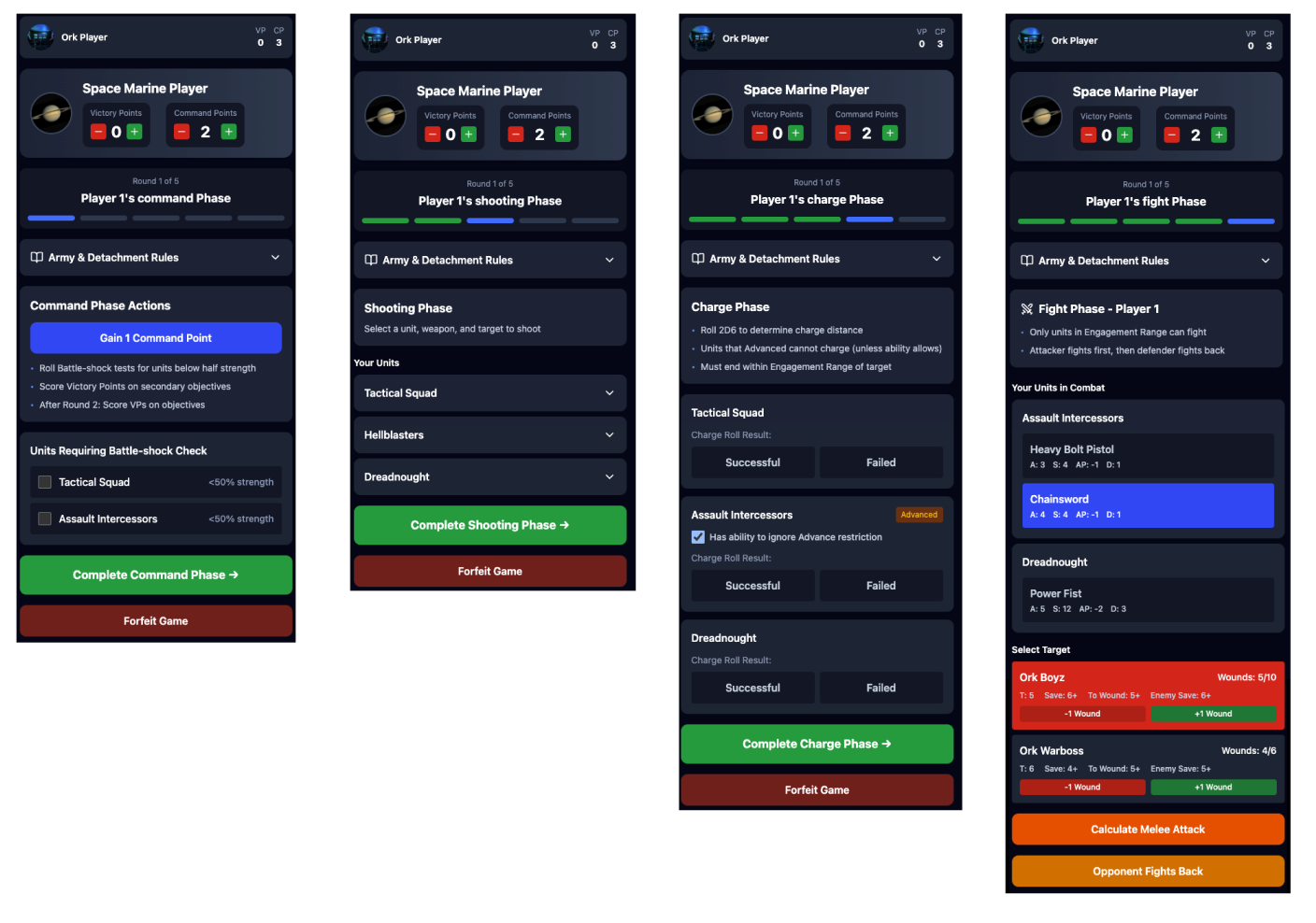

Planning to leverage Figma Make's ability to build functional applications, my next task was to develop a design library in Figma. This was made easier by limiting myself to the current design standards for the current 40K app, I just needed to remake them, apply auto layouts, and build any additional components that I would need. After the library was made, I began work on high fidelity mockups for each step in the flow. One page for each phase, plus the version you would see when it was the other players turn.
The design library allowed me to modify components as I went. If I found a component was too rigid or if I needed a different variant, I could adjust it and changes would cascade down to each related component. It also keeps things consistent leading to the prototyping step.
The design library allowed me to modify components as I went. If I found a component was too rigid or if I needed a different variant, I could adjust it and changes would cascade down to each related component. It also keeps things consistent leading to the prototyping step.
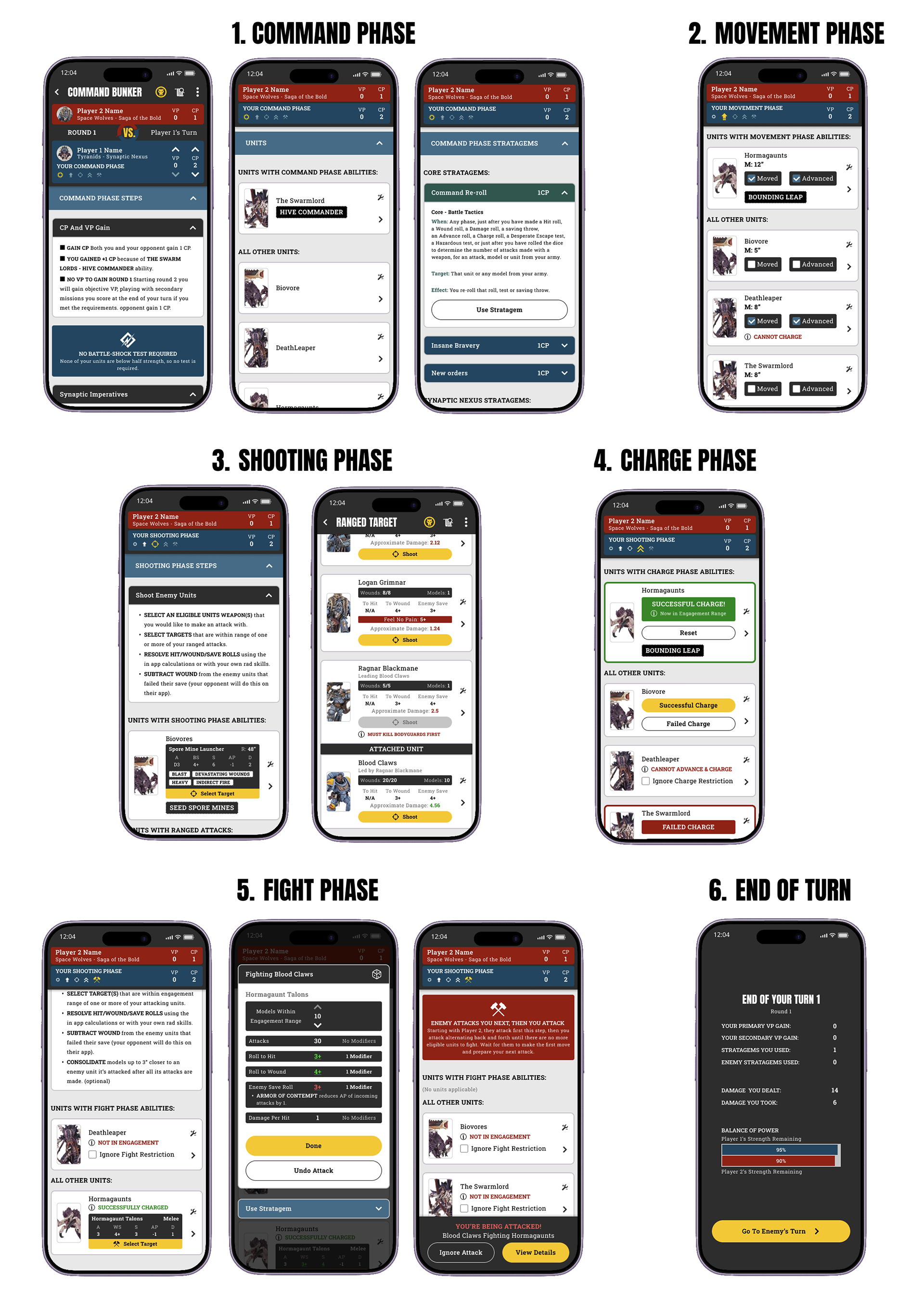

Nailing down the flow was done, I simplified it to allow new players to use the helpful tools while providing just enough information on the surface for advanced players to reference and track game data. At this point the next step was to upload all the mockups into Figma Make and build the prototype. However, the current state of Figma Make left something to be desired when it came to pixel perfect prototyping. The main issue was the token usage, it took too much time and resources to make it polished so I pivoted.
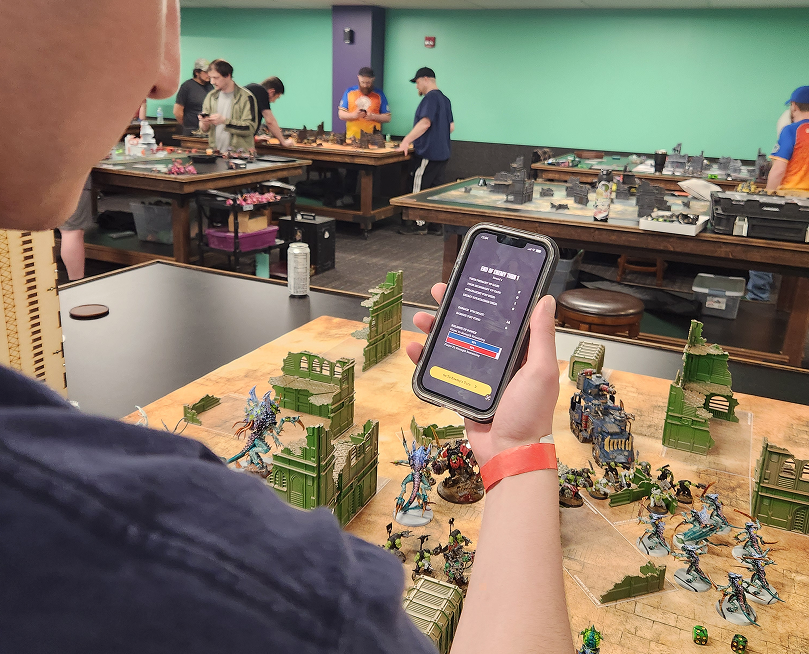
I built a clickable prototype using Figma's prototyping feature and demoed it at local meetup with over 30 players active in the 40K community. I heard feedback from many advanced and new players alike and started noting how I could improve the app further. The current iteration was great for new players, and some further development of game set-up, score & secondary tracking, and game records was the main need for advanced players. If I ever continue to develop this idea, those advanced features are the next step with the bulk of the ideas already mapped out thanks to the feedback.
"I can see this being incredibly valuable for new players learning the game. Once they learn the basics they can play more and get better."
I built a clickable prototype using Figma's prototyping feature and demoed it at local meetup with over 30 players active in the 40K community. I heard feedback from many advanced and new players alike and started noting how I could improve the app further. The current iteration was great for new players, and some further development of game set-up, score & secondary tracking, and game records was the main need for advanced players. If I ever continue to develop this idea, those advanced features are the next step with the bulk of the ideas already mapped out thanks to the feedback.
"I can see this being incredibly valuable for new players learning the game. Once they learn the basics they can play more and get better."

Command Phase
- Showcases what a player can do in the command phase
- Track victory points and automatically adds command points
- See your units and adjust modifiers that affect the game
- Use Stratagems that are specific to the command phase
Movement Phase
- Showcases what a player can do in the movement phase
- Identify which units to move and their values
- Setting units to advance will prevent them from doing other actions later
- Use Stratagems that are specific to the movement phase
Shooting Phase
- Showcases what a player can do in the shooting phase
- Identify which units have abilities during the shooting phase
- User can see based on past actions if a unit can or cannot shoot
- See which targets would be ideal for each attack
- Move faster while the app auto calculates roles for you and your opponent
- Use digital dice roles if you prefer
- Use Stratagems that are specific to the shooting phase
Charge Phase
- Showcases what a player can do in the charge phase
- Simply make your charge rolls and set which units succeeded and which failed
- User can see based on past actions if a unit can or cannot charge
- Use Stratagems that are specific to the charge phase
Fight Phase
- Showcases what a player can do in the fight phase
- Breaks up the phase into the two sections to clarify complexity
- Identify which units have abilities during the fight phase
- See which targets would be ideal for each attack
- Move faster while the app auto calculates roles for you and your opponent
- Use digital dice roles if you prefer
- Use Stratagems that are specific to the Fight phase
- Post turn information to see how well you and your opponent did
Opponent's Turn
- Showcases what a player can do while it is the opponents turn
- Identify which units have abilities during each phase
- Get alerted when you are attacked
- Use Stratagems that are specific to each phase
- Post turn information to see how well you and your opponent did
Final Thoughts
Thank you for coming this far! From beginning to end of this project, I worked hard to apply the same rigor that I would apply to a real world product. I spent over 100 hours on this idea and as a player something like this would defiantly help me play with more confidence and quickly become a better player. If you have any questions, comments, or feedback let me know!
Thank you!